
Last Updated: October 7, 2026
Your iPhone battery naturally loses capacity over time, but good charging and usage habits can help slow down battery aging. If you are searching for how to maintain iPhone battery health, how to keep iPhone battery health high, or how to extend iPhone battery life, a few simple changes can make a meaningful difference.
Every rechargeable lithium-ion battery has a limited lifespan. You cannot prevent battery health from decreasing forever, but you can reduce unnecessary battery wear and help your iPhone battery remain healthy for longer.
In this guide, we explain the best iPhone battery health tips, charging habits, temperature precautions, and settings that can help extend the useful life of your iPhone battery.
What Is iPhone Battery Health?
Battery Health shows the maximum capacity of your iPhone battery compared with when it was new.
You can check it by going to:
Settings → Battery → Battery Health & Charging
On supported iPhone models, you can see information such as Maximum Capacity and whether the battery is operating normally.
For example, a battery showing 100% Maximum Capacity has approximately the same maximum capacity as when it was new. As the battery ages, this percentage gradually decreases.
Can You Prevent iPhone Battery Health From Decreasing?
No. You cannot completely prevent iPhone battery health from decreasing.
Battery aging is a normal chemical process that occurs with rechargeable lithium-ion batteries.
However, you can slow down battery degradation by avoiding excessive heat, reducing unnecessary full charging cycles, using optimized charging features, and following good charging practices.
The goal should not be to keep Battery Health at 100% forever. Instead, focus on reducing unnecessary battery wear.
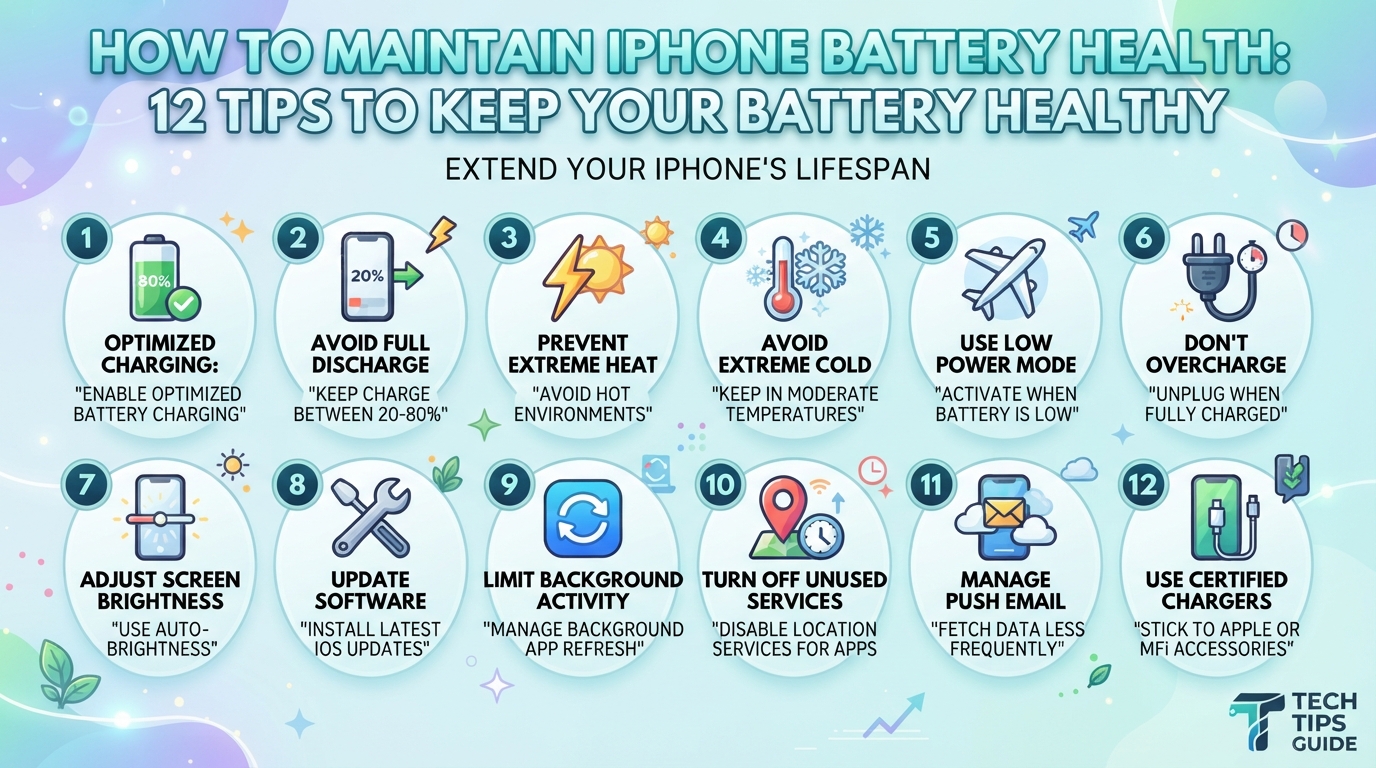
12 Best Tips to Maintain iPhone Battery Health
1. Avoid Extreme Heat
Heat is one of the biggest factors that can accelerate battery aging.
Avoid leaving your iPhone:
- Inside a hot car
- Under direct sunlight
- Near heaters
- Under a pillow while charging
- In extremely hot environments for long periods
If your iPhone becomes unusually hot while charging or using demanding applications, allow it to cool down.
Pro tip: Don’t charge your iPhone in direct sunlight or in an area where heat cannot escape.
2. Use Optimized Battery Charging
Apple provides Optimized Battery Charging to help reduce the amount of time your iPhone spends fully charged.
When the feature is enabled, your iPhone can learn your charging routine and delay charging beyond 80% until it expects that you will need the phone.
To check the setting, go to:
Settings → Battery → Charging
Depending on your iPhone model and iOS version, you may see different charging options.
Keeping optimized charging features enabled can help reduce long periods spent at a very high charge level.
3. Don’t Always Charge to 100%
You don’t necessarily need to charge your iPhone to 100% every time.
If your daily routine allows it, charging to a lower level can reduce the time your battery spends at a very high state of charge.
Some newer iPhone models also provide a Charge Limit option, allowing you to set a maximum charging level.
For example, if you have easy access to a charger throughout the day, you may choose a lower charge limit instead of charging to 100% every time.
However, charging to 100% when you need the extra battery life is completely fine.
4. Avoid Regularly Letting the Battery Reach 0%
Occasionally allowing your iPhone battery to become very low is not a major problem.
However, regularly running the battery completely empty is unnecessary.
Instead of waiting until the iPhone shuts down, try charging it when the battery becomes reasonably low.
You don’t need to follow a strict percentage. The important thing is to avoid repeatedly using the battery until the phone completely shuts down.
5. Don’t Worry About Charging Overnight
Modern iPhones are designed to manage charging automatically.
If you charge your iPhone overnight, features such as optimized charging can help manage how the battery is charged.
Nevertheless, keeping the phone in a hot environment while charging should be avoided.
If your iPhone gets hot during overnight charging, improve ventilation and check whether the charger or cable is causing excessive heat.
6. Use a Good-Quality Charger and Cable
Use Apple-certified or reputable charging accessories.
Poor-quality chargers and damaged cables can potentially cause charging problems, excessive heat, or other safety issues.
When buying an iPhone charger, choose a reputable manufacturer and make sure the charger is appropriate for your iPhone.
Also replace cables that are:
- Frayed
- Damaged
- Exposed internally
- Overheating
- Loose at the connector
A good-quality charger is an important part of safe iPhone charging.
7. Don’t Use Your iPhone Heavily While It Is Hot
Gaming, video recording, navigation, and other demanding activities can generate heat.
Using the iPhone heavily while charging can increase the overall temperature of the device.
You don’t have to stop using your iPhone while it is charging, but if it becomes noticeably hot, reduce demanding activities and allow it to cool.
This is particularly important when:
- Playing graphics-intensive games
- Recording long 4K videos
- Using GPS navigation
- Using intensive AI applications
- Downloading large files
- Using the phone in direct sunlight
8. Keep iOS Updated
Apple regularly releases iOS updates that can include performance improvements, bug fixes, security updates, and power-management improvements.
Keeping your iPhone updated can help ensure that your device is running the latest available software.
Go to:
Settings → General → Software Update
Before installing a major update, make sure your iPhone has sufficient battery or connect it to a charger.
9. Reduce Unnecessary Background Activity
Some applications can use battery power in the background.
You can check which apps are consuming the most battery by going to:
Settings → Battery
If a particular application consistently uses a large amount of battery, consider checking its settings or reducing unnecessary background activity.
This won’t directly stop chemical battery aging, but reducing unnecessary battery consumption can mean fewer charging cycles over time.
10. Manage Location Services
Location services can consume additional power when apps frequently access your location.
Go to:
Settings → Privacy & Security → Location Services
Review which applications actually need your location.
For apps that don’t require continuous location access, consider selecting an appropriate option such as While Using the App where available.
Only disable location access when it makes sense for the app and your privacy preferences.
11. Don’t Obsess Over Battery Health Percentage
One of the biggest mistakes iPhone users make is constantly checking Battery Health.
Seeing your battery health drop from 100% to 99% does not mean that something is wrong with your iPhone.
Battery capacity naturally decreases as the battery ages.
The percentage can also change differently from one iPhone to another depending on:
- Usage
- Charging patterns
- Temperature
- Number of charge cycles
- Battery age
- Device model
- Software behavior
Focus on healthy usage habits rather than trying to keep the number at exactly 100%.
12. Replace the Battery When Necessary
Even with excellent charging habits, an iPhone battery will eventually wear out.
If your iPhone battery capacity has significantly decreased or you experience problems such as:
- Unexpected shutdowns
- Very short battery life
- Performance problems
- Battery service warnings
- Battery swelling
you may need to have the battery inspected or replaced by Apple or an authorized service provider.
A battery replacement can significantly improve the usable life of an older iPhone.
Best iPhone Charging Habits
If you want a simple routine for maintaining iPhone battery health, follow these habits:
Do:
- Keep your iPhone away from extreme heat.
- Use good-quality charging accessories.
- Enable Apple’s available optimized charging features.
- Keep iOS updated.
- Charge when convenient instead of waiting for 0%.
- Use a charge limit if your iPhone supports it and it suits your routine.
- Allow the phone to cool down if it becomes hot.
Avoid:
- Leaving the iPhone in a hot car.
- Charging in direct sunlight.
- Using damaged charging cables.
- Regularly draining the battery completely.
- Keeping a hot iPhone under a pillow while charging.
- Using extremely demanding applications for long periods when the phone is already hot.
Does Fast Charging Damage iPhone Battery Health?
Fast charging itself does not mean that your iPhone battery will suddenly become unhealthy.
Modern iPhones are designed to manage charging and temperature.
However, heat is an important factor in battery aging. If a particular charging setup consistently makes your iPhone excessively hot, reducing the heat is more important than avoiding fast charging simply because it is fast.
Use a reputable charger and allow sufficient ventilation around the phone while charging.
Is Wireless Charging Bad for iPhone Battery Health?
Wireless charging is not inherently bad for your iPhone battery.
However, wireless charging can sometimes generate more heat depending on the charger, alignment, environment, and charging conditions.
If your iPhone becomes excessively warm during wireless charging, improve ventilation or use a different charging method.
The main goal is to avoid prolonged excessive heat.
How to Keep iPhone Battery Health at 100%
There is no guaranteed method to keep an iPhone battery at 100% Battery Health permanently.
If your iPhone is new, you can help slow battery degradation by:
- Avoiding excessive heat.
- Using optimized charging.
- Using a suitable charge limit when practical.
- Avoiding unnecessary complete discharge.
- Using high-quality charging accessories.
- Keeping iOS updated.
- Avoiding prolonged heavy use when the phone is already hot.
Even with perfect habits, Battery Health will eventually decrease because lithium-ion batteries naturally age.
How Long Does an iPhone Battery Last?
The actual lifespan depends on the model, usage pattern, charging habits, temperature, and other factors.
Apple designs iPhone batteries to retain a significant portion of their original capacity after a specified number of complete charge cycles under ideal conditions, but real-world battery performance varies.
Instead of focusing only on the Battery Health percentage, consider your actual daily battery life and whether the phone is meeting your needs.
Final Thoughts
The best way to maintain iPhone battery health is not to follow complicated charging rules. The most important habits are to avoid excessive heat, use Apple’s charging-management features, use quality charging accessories, and avoid unnecessary battery stress.
Don’t worry if your Battery Health eventually falls from 100%. Battery degradation is normal for rechargeable batteries.
With sensible charging and usage habits, you can help your iPhone battery remain useful for a longer period and potentially delay the need for a battery replacement.
Frequently Asked Questions
How can I maintain my iPhone battery health?
Avoid excessive heat, use optimized charging features, use quality charging accessories, keep iOS updated, and avoid repeatedly draining the battery completely.
How do I keep my iPhone battery health at 100%?
You cannot guarantee 100% Battery Health permanently. Battery capacity naturally decreases with age. Good charging habits can only help slow the rate of degradation.
Is charging an iPhone overnight bad?
Modern iPhones are designed to manage charging, and optimized charging features can reduce the time spent at a high charge level. Avoid excessive heat while charging overnight.
Does fast charging reduce iPhone battery health?
Fast charging is supported by iPhones, but excessive heat can accelerate battery aging. Use a reputable charger and avoid charging in hot environments.
Is wireless charging bad for iPhone battery health?
Wireless charging is generally safe, but some wireless charging situations can generate additional heat. Excessive heat should be avoided.
Should I charge my iPhone to 100%?
You can charge your iPhone to 100% when you need maximum battery life. If you don’t need a full charge, a lower charge limit may be useful on supported iPhone models.
Should I let my iPhone battery reach 0%?
You don’t need to regularly drain your iPhone to 0%. Charging before the battery becomes completely empty is perfectly fine.
What is the biggest enemy of iPhone battery health?
Excessive heat is one of the most important factors to avoid because high temperatures can accelerate lithium-ion battery aging.
Disclaimer: This article provides general technology information and is not a substitute for Apple’s official support documentation. Charging features and settings may vary depending on your iPhone model and iOS version.